AIDIO lives inside your DAW. It listens to your stems, compares them to genre targets and your own references, and tells you exactly what to try, in your engineer's voice, with bracketed numbers and reasons. Never guesswork.
Three tabs that mirror how engineers actually work. Each tab analyses your session at a different stage of the production. Pick the tab that matches what you're doing right now.
Per-stem analysis. AIDIO listens to one channel at a time and reports on the intrinsic quality of that sound: tonal shape, transient character, compression behaviour, anti-patterns (sample-pack bias, over-aggressive HPF, harsh resonances).
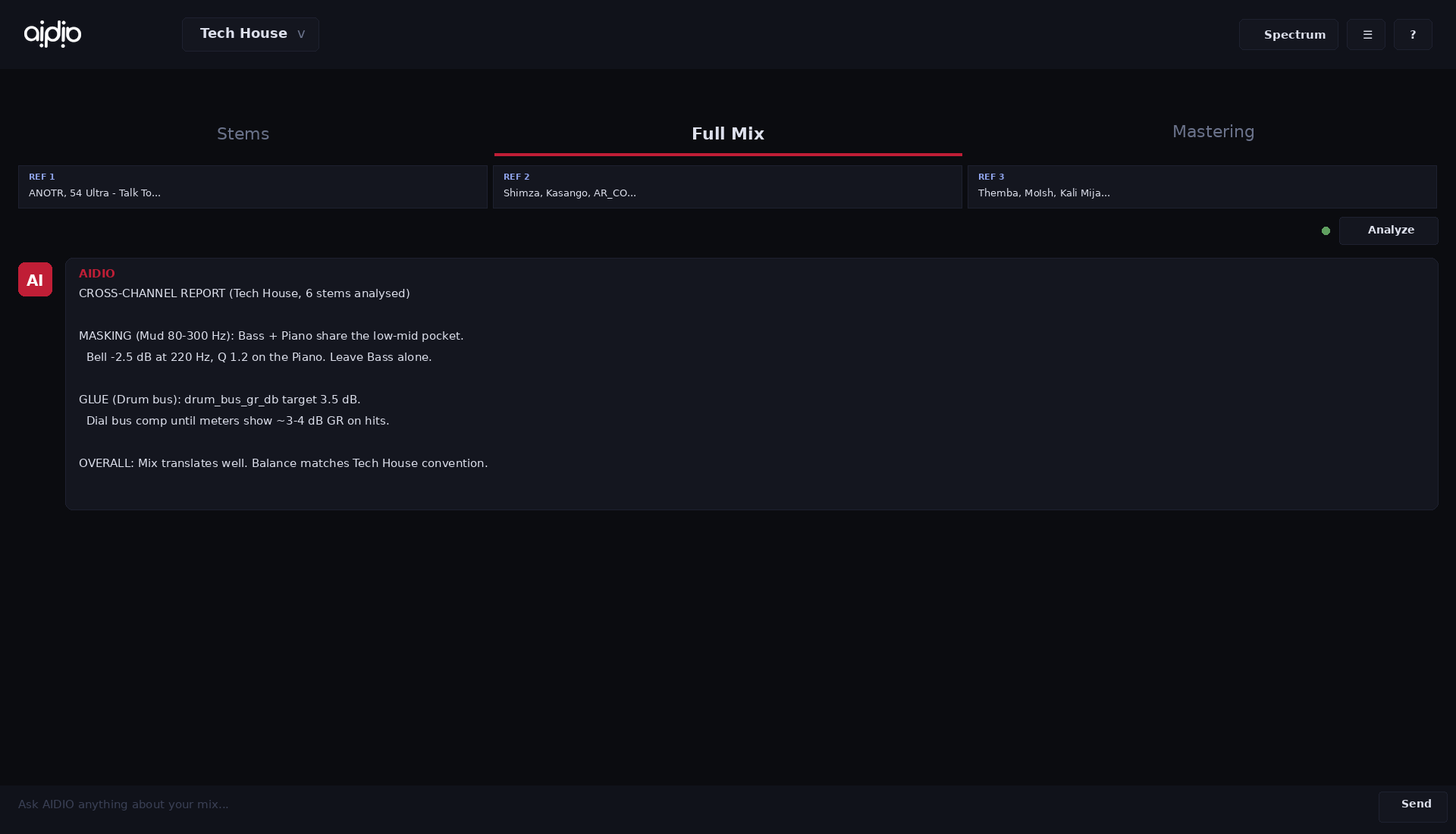
Cross-channel analysis. AIDIO listens to every active stem at once and reports on how they interact: frequency masking between channels, level hierarchy versus the genre target, glue and bus coherence, panning and stereo distribution.
Master bus analysis. AIDIO listens to your printed master across a full playthrough and reports on integrated loudness, true peak, dynamic range, tonal balance versus the genre target, stereo correlation, DC offset, plus master-stage anti-patterns (over-limiting, mud buildup, top skew).
Pick your proficiency mode in settings: Beginner, Intermediate, or Expert. It applies to every tab: Stems, Full Mix, and Mastering. Below is the SAME Kick analysis (Stems tab, Tech House) rendered in each mode. The data is identical. The voice changes.
Forums, conflicting answers, expensive guesswork. Tracks that don't translate.
Press Analyze. Real numbers from YOUR stems, broken down per channel, matched against your reference.
No new workflow, no exports, no waiting. AIDIO sits in your DAW like any other plugin.
AIDIO Reader goes on each channel you want feedback on. The Main plugin sits on your master bus. Pick your genre from the dropdown. That's setup, done.
Hit play, AIDIO listens for 15 seconds across every active stem, builds a cross-channel report on balance, masking and level hierarchy. For mastering it listens to the whole track.
Chat in plain language. Load up to 3 references for level-matched comparison. Every suggestion comes with bracketed numbers so you know exactly what AIDIO heard and why.
Load up to 3 references. AIDIO normalises loudness before comparing, so it never tells you to raise your stem to match a louder track.
Knows which stems are eating each other, in which band, by how many dB. The advice is "kick masks bass 80-110 Hz by 5 dB," not generic tutorial talk.
Tech House, Hip-Hop, Trap, Pop, Rock, Drum & Bass, more. Every recommendation respects the genre's actual loudness, balance, and stereo image conventions.
Beginner mode explains. Intermediate talks like a peer. Expert hands you facts and numbers. Switch any time, no relearning.
Analysis runs locally inside your DAW. Only anonymised numbers are sent to the AI, never your audio. Your unreleased work never leaves your machine.
Fifteen years in this industry. Producing, engineering, working alongside world-renowned artists. One thing became clear: the gap between a great idea and a great-sounding record has almost nothing to do with talent.
It comes down to access. To knowledge, to studios, to engineers who've spent years learning what I've spent years learning. Most artists don't have that. And the streaming landscape punishes them for it. A poorly mixed track gets buried no matter how good the music is.
AIDIO exists to close that gap. Not to replace the artist's voice. To put the knowledge of an experienced engineer directly inside the tool you're already using. Your mix. Your sound. Your call.
All tiers ship at launch. Closed alpha testers get free Producer-tier access for the alpha period.
Enterprise & B2B plans available. Contact us
[Kick: Sub -8 dBFS] or [Ref Vocal: Pres Healthy]. So you always know what AIDIO heard, and you can verify it yourself.A small, hand-picked closed alpha. Spots are limited. Real feedback. Real influence on the product.