Closed Alpha — Limited spots

Your mix.
An engineer beside you.

AIDIO lives inside your DAW. It listens to your stems, compares them to genre targets and your own references, and tells you exactly what to try, in your engineer's voice, with bracketed numbers and reasons. Never guesswork.

AIDIO plugin showing the Choose your plan onboarding overlay with five tiers, Producer marked as Most Popular, running inside the Stems tab on a Mac.
Works with
Ableton Live Logic Pro Pro Tools FL Studio Cubase Studio One Reaper
One plugin. Three workflows.

Stems, Full Mix, Mastering.

Three tabs that mirror how engineers actually work. Each tab analyses your session at a different stage of the production. Pick the tab that matches what you're doing right now.

TAB 01
Stems
Sound design

Per-stem analysis. AIDIO listens to one channel at a time and reports on the intrinsic quality of that sound: tonal shape, transient character, compression behaviour, anti-patterns (sample-pack bias, over-aggressive HPF, harsh resonances).

What it answers
  • Is my kick sitting right for the genre?
  • Is my vocal sibilant or boxy?
  • Are my hats too bright for a Trap track?
  • Should I saturate this bass more?
Use it when
  • You're shaping individual sounds
  • Designing kits, programming drums, treating vocals
  • Before you start balancing the mix
TAB 02
Full Mix
Mix bus stage

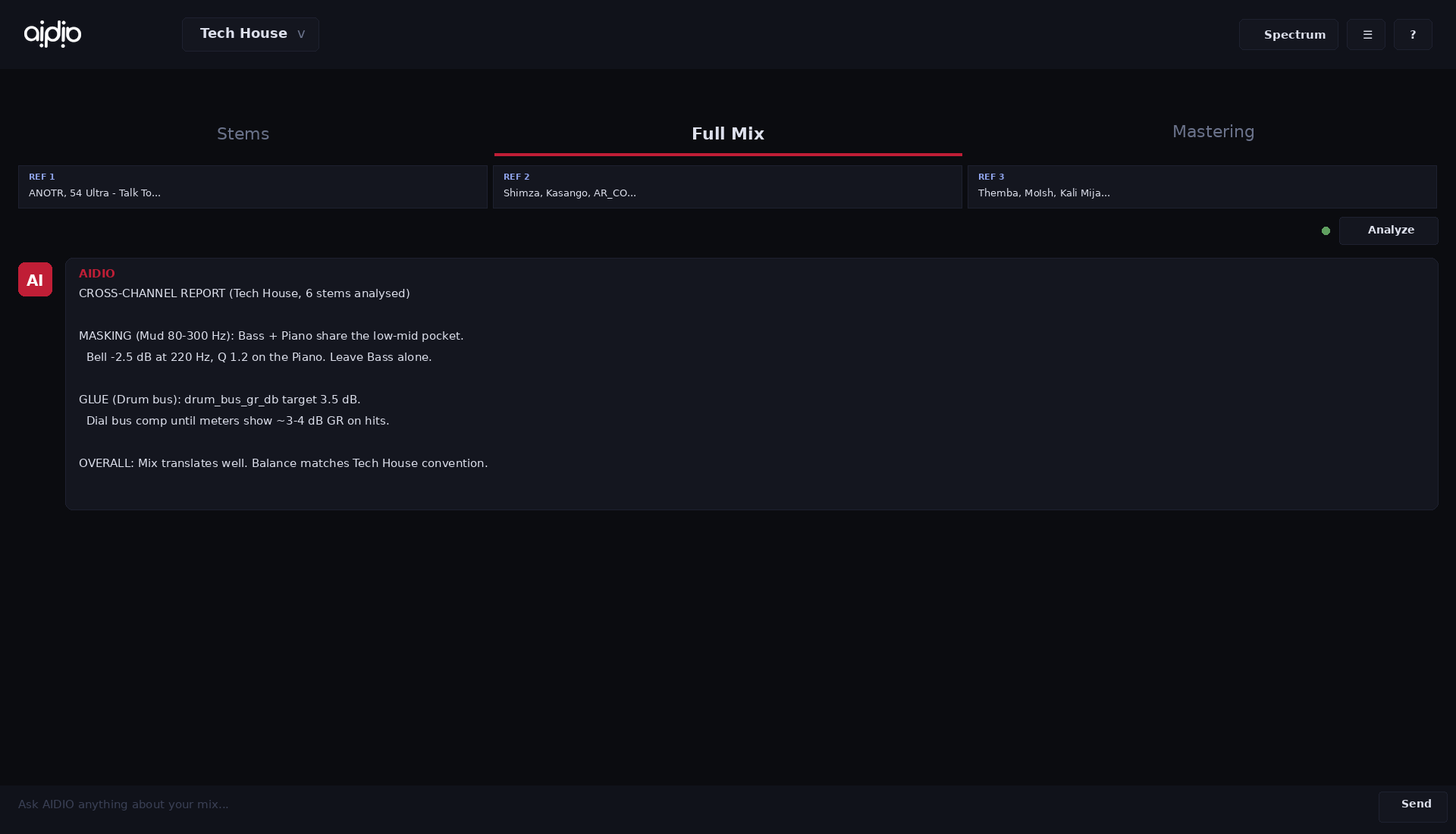
Cross-channel analysis. AIDIO listens to every active stem at once and reports on how they interact: frequency masking between channels, level hierarchy versus the genre target, glue and bus coherence, panning and stereo distribution.

What it answers
  • Is my kick fighting my bass?
  • Are the vocals sitting on top of the mix?
  • Is the snare loud enough to lead?
  • Do my stems balance versus a reference?
Use it when
  • You're balancing levels, panning, EQ across stems
  • Subtractive EQ, sidechain decisions, glue compression
  • Comparing your mix to references
TAB 03
Mastering
Master bus, final

Master bus analysis. AIDIO listens to your printed master across a full playthrough and reports on integrated loudness, true peak, dynamic range, tonal balance versus the genre target, stereo correlation, DC offset, plus master-stage anti-patterns (over-limiting, mud buildup, top skew).

What it answers
  • Is my master streaming-ready (LUFS, true peak)?
  • Is my low end too hot for the genre?
  • Am I over-limited and squashed?
  • Is the stereo image healthy across bands?
Use it when
  • You're applying the master chain (EQ, compression, limiter)
  • Final loudness and tonal balance pass
  • Pre-bounce compliance check
Before AIDIO

Forums, conflicting answers, expensive guesswork. Tracks that don't translate.

"Why does my mix sound muddy?"
Reddit: 47 conflicting answers
YouTube tutorial about EQ, generic genre
$200 plugin you don't know how to use
Still sounds wrong on Spotify
With AIDIO

Press Analyze. Real numbers from YOUR stems, broken down per channel, matched against your reference.

AIDIO · Full Mix analysis fx: Sounds overly airy in the mix.
• Competes with Lead Vocals in the air band, causing masking.
• Very low overall level at -70.0 LUFS, almost inaudible except for the air frequencies.

Lead Vocals: Dominates the air band, similar to fx.
• Masking with fx (both very heavy in the air band).
• Overall level too low at -70.0 LUFS, lacking presence.

Bass: Sub-bass is heavy, solid low-end foundation.
• No significant masking, mud could be reduced for clarity.
• Level -20.6 LUFS is strong, could be adjusted for balance with drums.

Mix priority: Resolve the air clash between fx and Lead Vocals to achieve clarity and presence.
How AIDIO works

Three moves, then ship it.

No new workflow, no exports, no waiting. AIDIO sits in your DAW like any other plugin.

STEP 01

Insert the plugins

AIDIO Reader goes on each channel you want feedback on. The Main plugin sits on your master bus. Pick your genre from the dropdown. That's setup, done.

STEP 02

Press Analyze

Hit play, AIDIO listens for 15 seconds across every active stem, builds a cross-channel report on balance, masking and level hierarchy. For mastering it listens to the whole track.

STEP 03

Ask, apply, A/B

Chat in plain language. Load up to 3 references for level-matched comparison. Every suggestion comes with bracketed numbers so you know exactly what AIDIO heard and why.

Built for the studio

Features that earn their seat on the master bus.

Reference-matched, level-aware

Load up to 3 references. AIDIO normalises loudness before comparing, so it never tells you to raise your stem to match a louder track.

Cross-stem masking matrix

Knows which stems are eating each other, in which band, by how many dB. The advice is "kick masks bass 80-110 Hz by 5 dB," not generic tutorial talk.

Genre-aware tolerances

Tech House, Hip-Hop, Trap, Pop, Rock, Drum & Bass, more. Every recommendation respects the genre's actual loudness, balance, and stereo image conventions.

Three voices, one assistant

Beginner mode explains. Intermediate talks like a peer. Expert hands you facts and numbers. Switch any time, no relearning.

Your audio stays yours

Analysis runs locally inside your DAW. Only anonymised numbers are sent to the AI, never your audio. Your unreleased work never leaves your machine.

AIDIO Full Mix tab showing cross-channel analysis with per-stem breakdown
A note from the founder

Fifteen years in this industry. Producing, engineering, working alongside world-renowned artists. One thing became clear: the gap between a great idea and a great-sounding record has almost nothing to do with talent.

It comes down to access. To knowledge, to studios, to engineers who've spent years learning what I've spent years learning. Most artists don't have that. And the streaming landscape punishes them for it. A poorly mixed track gets buried no matter how good the music is.

AIDIO exists to close that gap. Not to replace the artist's voice. To put the knowledge of an experienced engineer directly inside the tool you're already using. Your mix. Your sound. Your call.

Rafael Bueno de Mesquita Founder & CEO, AIDIO · Sound Engineer
Pricing

Start free. Scale when you ship.

All tiers ship at launch. Closed alpha testers get free Producer-tier access for the alpha period.

Freemium
Free
forever
 
Master bus only · Basic AI
Great for trying AIDIO.
Hobbyist
9
/ month
Full AI · 5 channels / 2 projects
For producers just getting started.
Most popular
Producer
19
/ month
Full AI · 8 channels / 4 projects
For active producers and beatmakers.
Engineer
39
/ month
Full AI · 12 channels / 6 projects
For mixing engineers and professionals.
Studio
79
/ month
Full AI · 16 channels / unlimited projects
For studios and high-volume workflows.
Student
Discount
 
Valid student card required
See aidiomusic.ai for details.

Enterprise & B2B plans available. Contact us

Questions

AIDIO is a VST3 and AU plugin compatible with every major DAW: Ableton Live, Logic Pro, Pro Tools, FL Studio, Cubase, Studio One, Reaper, and more. Mac and Windows.
LANDR processes your audio and hands it back. AIDIO works inside your DAW, analyses your session in real time, and tells you what to do and why. You stay in control. The AI is your engineer, not your replacement.
Yes. Audio analysis happens locally inside your DAW. Only anonymised numbers (loudness, band energies, transient stats, etc.) are sent to the AI for advice. Your raw audio never leaves your machine.
Every recommendation cites the measurement that triggered it. Like [Kick: Sub -8 dBFS] or [Ref Vocal: Pres Healthy]. So you always know what AIDIO heard, and you can verify it yourself.
Closed alpha is shipping now to a small hand-picked group. Soft public launch is targeted for late 2026 / early 2027.
Early plugin access, direct line to the founding team, and a real voice in shaping the product. We ask for regular feedback and willingness to test new features as they're released. The alpha period is approximately 60 days.
Switch to Beginner mode. AIDIO explains in plain language, with no LUFS jargon, no "Q values," just three blocks: HOW TO HEAR IT, WHAT TO DO, HOW TO SET IT UP. The goal is to make you a better engineer over time, not to overwhelm.

Be part of something new.

A small, hand-picked closed alpha. Spots are limited. Real feedback. Real influence on the product.

Application received. We'll be in touch if you're selected.
Sorry, something went wrong. Please email rafael@aidiomusic.ai directly.